Device Details
Overview
| Name | Version: | GFLClipTransport 1.0 |
| Author: | gfl |
| Device Type: | Audio Effect |
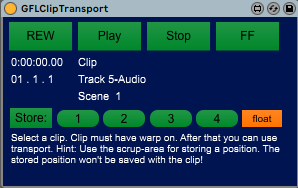
| Description: | Move this in the master-track and hit float. Select a Clip (clip must have warp on!). After that you can use transport. To store: click on store and than one of the four buttons right from the store-button. To recall: click on the number-button where you stored the position. The stored position won't be saved with the clip but with the set. |
Details
| Live Version Used: | 10.0.1 |
| Max Version Used: | 7.3.5 |
| Date Added: | Mar 15 2020 15:17:31 |
| Date Last Updated: | No Updates |
| Downloads: | 196 |
| ⓘ License: | None |
Average Rating
Log in to rate this device |
-n/a- |
Files
| Device File: | GFLClipTransport.amxd |
Login to comment on this device.
Browse the full library