Device Details
Overview
| Name | Version: | PhaseLock 2.3 2.3 |
| Author: | fluctor |
| Device Type: | Audio Effect |
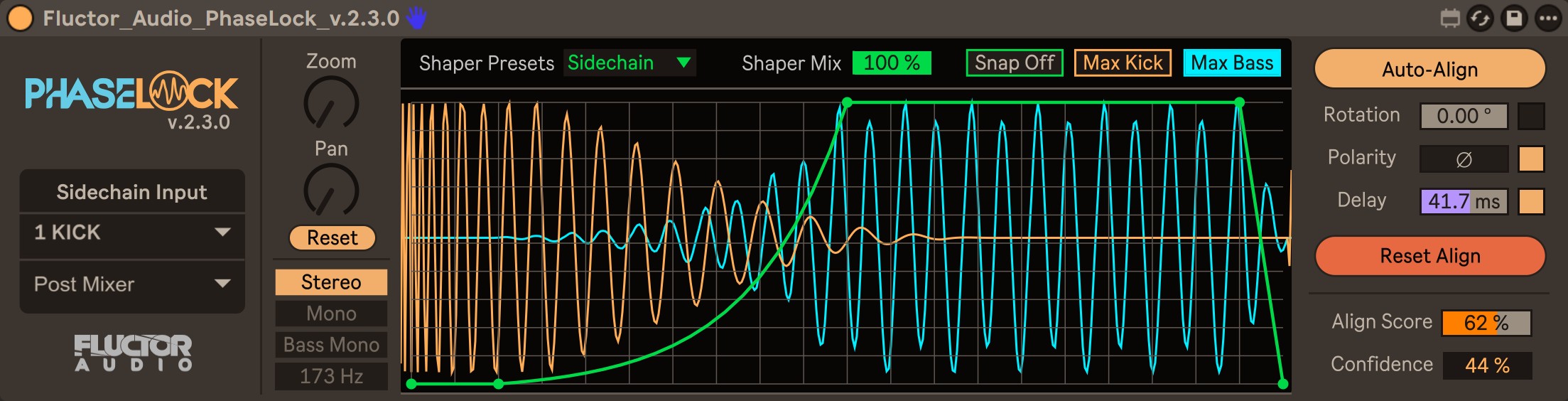
| Description: | PhaseLock 2.3 by Fluctor Audio is a kick and bass phase alignment audio device for Ableton Live, with a live alignment score, three stereo modes, and a tempo-synced volume shaper. WHAT IT DOES When a kick and a bass share the same low frequencies, their waveforms overlap. If that overlap is out of phase, the two signals partially cancel and the low end loses weight. PhaseLock measures the phase relationship between a kick reference and your bass, displays it as a score, and corrects it with three tools: delay, polarity, and phase rotation. AUTO-ALIGN Auto-Align captures a short window of kick and bass, runs a normalized cross-correlation over a delay range of -100 to +150 ms, and selects the timing and polarity that give the highest correlation. It reports a Confidence value derived from the correlation strength, so you can tell a solid result from a weak one. Three switches decide which controls Auto-Align is allowed to write: Polarity, Delay, and Phase Rotation. A disabled control keeps its current value, and the search optimizes around it. With all three disabled, Auto-Align measures and reports without changing anything. Delay and polarity are enabled by default. Both preserve the waveform: one is a time shift, the other a sign inversion. Phase rotation is disabled by default. It is an allpass process, so the magnitude response is unchanged, but it applies a frequency-independent phase shift, which alters the waveform shape, and the optimal angle depends on the note being analyzed. It is most useful on sustained material that stays on one note, and it is applied only when it clearly outperforms the transparent result. STEREO MODES Stereo aligns without altering the stereo image. Bass Mono sums only the content below an adjustable cutoff to mono through a mid-side stage and leaves everything above it untouched. Mono sums the full bandwidth. DISPLAY A tempo-synced dual oscilloscope draws one beat of the kick reference and the processed bass. Max Kick and Max Bass are display magnification only and do not affect the audio path. The Align Score meter updates continuously and is independent of Auto-Align. VOLUME SHAPER An editable curve applies gain shaping to the bass once per beat, with presets and a wet/dry mix. Curves are stored per instance and saved with the Live Set. A Snap to Grid switch constrains the horizontal position of points while drawing. LATENCY COMPENSATION Devices placed before PhaseLock delay the audio but not the tempo grid, which normally pulls tempo-synced shaping early. PhaseLock reads the accumulated upstream latency reported by the chain and offsets the shaper envelope to compensate. It re-checks periodically, so adding, removing, or reordering devices is handled without user action. Plugins that misreport their own latency cannot be compensated for by any host-side method. TRANSPARENCY At neutral settings the signal path is unprocessed. Timing is sample-accurate and the beat reference follows the project tempo and sample rate. REQUIREMENTS Ableton Live 12 and Max 9 or higher. Live Suite, or Live Standard with the Max for Live add-on. Not compatible with Live 11 or earlier, or Max 8 or earlier. Windows and macOS. Walkthrough video: https://youtu.be/kna2iFuMxH8 Purchase: https://fluctor-audio.lemonsqueezy.com/checkout/buy/57638d10-793b-4c36-82f8-15c5fc473749 One-time purchase. Free updates within version 2. |
Details
| Live Version Used: | 12.4.3 |
| Max Version Used: | 9.1.4 |
| Date Added: | Aug 05 2026 05:46:16 |
| Date Last Updated: | No Updates |
| Downloads: | 0 |
| Website: | https://fluctor-audio.lemonsqueezy.com/checkout/buy/57638d10-793b-4c36-82f8-15c5fc473749 |
| ⓘ License: | Commercial |
Average Rating
Log in to rate this device |
-n/a- |
Login to comment on this device.
Browse the full library