Device Details
Overview
| Name | Version: | Track and Clip Colors 1.1.1 |
| Author: | FastLazyPanda |
| Device Type: | Audio Effect |
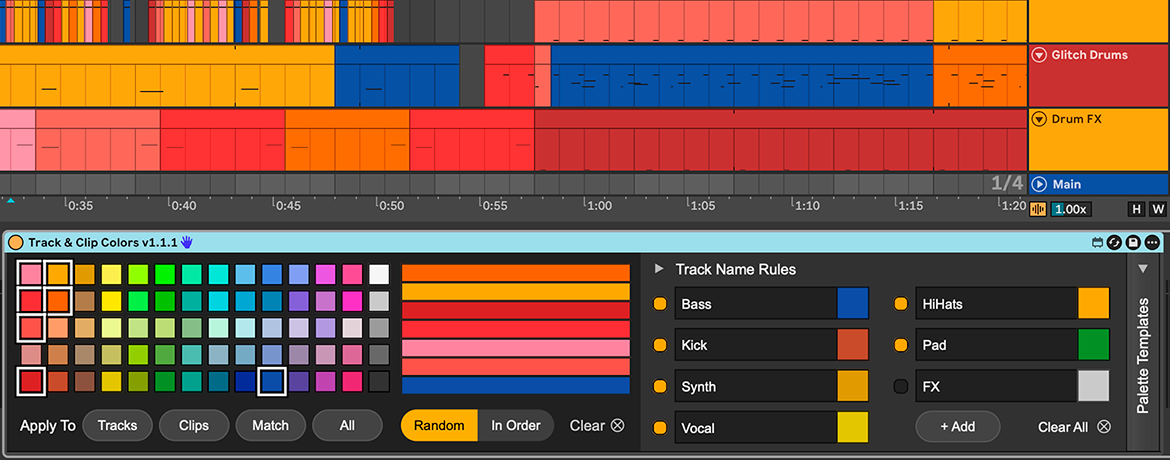
| Description: | Track & Clip Colors is a small Max for Live utility that keeps new tracks and clips inside a focused color palette. Ableton can pick colors for new tracks from its whole palette, and I often ended up with combinations I didn’t enjoy working with. With this device, you choose a palette that feels right for the project, and new tracks and clips can follow it automatically as the set grows. Track Name Rules can give tracks like Kick, Bass, Vocal, or FX their own colors based on their names. You can also recolor the whole set manually, use Random or In Order, and match clips to their parent tracks. I originally made it for my own projects and decided to share it because it made my sets nicer to look at and easier to navigate. Track & Clip Colors is available as a one-time purchase on the product page. A free Lite version is also available if you would like to try the manual palette workflow first: https://maxforlive.com/library/device/15948/track-and-clip-colors-lite Track & Clip Colors changes colors only. It does not process audio or alter musical content. Tested with Ableton Live 12 and Max for Live. Most features are expected to work in Live 11 as well, but I haven’t confirmed this by running the device there yet. If you use Live 11 and would like to help test compatibility, please email me first. Support: support@bohdansvyrydov.com |
Details
| Live Version Used: | 12.3.5 |
| Max Version Used: | 9.1.4 |
| Date Added: | Aug 04 2026 11:28:11 |
| Date Last Updated: | Aug 04 2026 14:08:52 |
| Downloads: | 0 |
| Website: | https://bohdansvyrydov.com/track-clip-colors?utm_source=maxforlive&utm_medium=referral |
| ⓘ License: | Commercial |
Average Rating
Log in to rate this device |
-n/a- |
Login to comment on this device.
Browse the full library