Device Details
Overview
| Name | Version: | yaFavoriteColors 1.0 |
| Author: | yarhammer |
| Device Type: | Audio Effect |
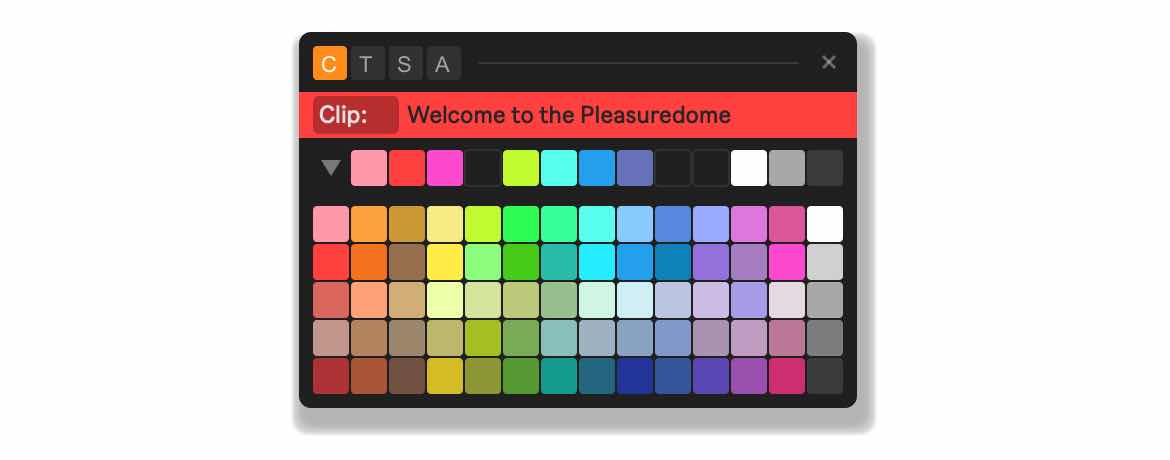
| Description: | ya_FavoriteColors is a Max for Live device for Ableton Live 12 that lets you pick — your favorite colors. Color Favorites: Save a personal selection from Live's 70 available colors as favorites. The palette can be collapsed to show only the favorites row, keeping the window compact. Favorites are managed by drag and drop: drag from the palette to add, drag within the row to reorder, drag out to remove. Applying Colors & Renaming: Click any favorite swatch to instantly apply it to the selected element. The mode buttons determine the target type — clips (Session and Arrangement View), tracks, or scenes. An automatic mode attempts to detect the last clicked object, though this may not always work reliably due to limitations in Live's API. The device also allows renaming the targeted object directly from the floating window. Quick Access: The floating window stays visible on top of Live's interface at all times. The "open at mouse" option positions it directly under the cursor when opened — combined with a keyboard shortcut, this allows very quick color changes without moving the mouse far from your current working area. Project Templates: Favorites are stored and can be made available across projects via a device preset. Requirements: Ableton Live 12, Max for Live |
Details
| Live Version Used: | 12.0.5 |
| Max Version Used: | 8.6.2 |
| Date Added: | Jun 03 2026 07:11:45 |
| Date Last Updated: | No Updates |
| Downloads: | 0 |
| Website: | https://yarhammer.gumroad.com/l/yafc |
| ⓘ License: | Commercial |
Average Rating
Log in to rate this device |
-n/a- |
Login to comment on this device.
Browse the full library