Device Details
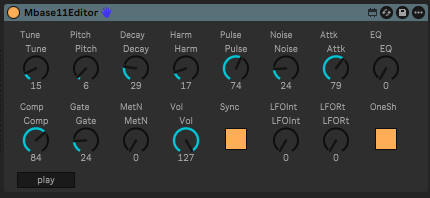
Overview
| Name | Version: | MBase 11 Editor 0.1.0 |
| Author: | damianyoko |
| Device Type: | MIDI Effect |
| Description: | MBase 11 Editor — Max for Live device for editing the Jomox MBase 11 analog kick drum module from inside Ableton Live. The MBase 11's two-button-and-a-knob hardware interface is rough on a good day; this gives you 16 automatable knobs in a Live device instead. What you get: • 16 automatable parameters: Tune, Pitch, Decay, Harmonics, Pulse, Noise, Attack, EQ, Compression, Gate Time, Metal Noise, Volume, LFO Sync, LFO Intensity, LFO Rate, LFO One Shot • Native Live automation — every knob is a proper Live parameter • Auto-resync on device load — parameters resend their stored values • Play button for quick auditioning Setup: 1. Drop the device on a MIDI track 2. Set the track's MIDI To to your hardware MIDI port (connected to the MBase 11's MIDI In), channel 1 3. Set the MBase 11's MIDI channel to 1 (Master Param "MidiCh") For audio on the same track, add Ableton's built-in External Instrument after the editor and configure its MIDI To + Audio From routings. Limitations (v0.1.0): • MIDI channel hardcoded to channel 1 • No SysEx preset save/load yet — planned for v0.2 Free under MIT license. Source: https://github.com/damianyoko/mbase11-editor If this saved you time: https://buymeacoffee.com/damianyoko ☕ Not affiliated with Jomox. "MBase 11" and "Jomox" are trademarks of Jomox GmbH. |
Details
| Live Version Used: | 12.2.7 |
| Max Version Used: | 9.0.8 |
| Date Added: | May 06 2026 20:42:49 |
| Date Last Updated: | No Updates |
| Downloads: | 11 |
| Website: | https://github.com/damianyoko/mbase11-editor |
| ⓘ License: | Attribution |
Average Rating
Log in to rate this device |
-n/a- |
Files
| Device File: | MBase11Editor.amxd |
Login to comment on this device.
Browse the full library