Device Details
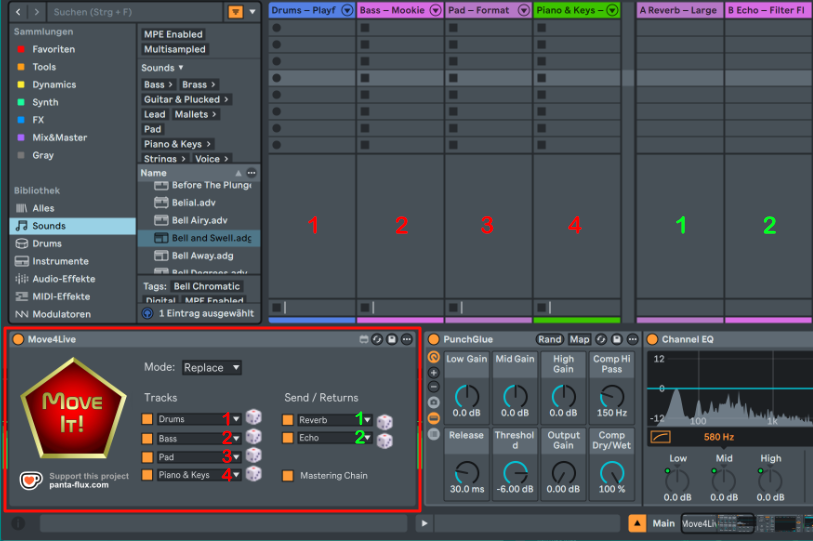
Overview
| Name | Version: | Move4Live 1.0 |
| Author: | PantaFlux |
| Device Type: | Audio Effect |
| Description: | The Ableton Move gets one thing exactly right: the moment you start a new set, you can just play. Four randomly chosen instruments, no setup, no “where do I even begin?” – you're making music immediately instead of making decisions. Move4Live brings that idea to Ableton Live on the desktop. One button. Four ready-to-play tracks – e.g. Drums, Bass, Pad, Synth Keys – with randomly selected presets from your library. Add optional return tracks and a mastering chain modeled directly after the one the Ableton Move uses in every new set. It started as a personal tool, built in the gaps of everyday life. Released because it might be useful for other musicians and bedroom producers too. — INSTRUMENT TRACKS · Up to four tracks with freely chosen categories · Random presets from your installed Ableton library · Re-roll individual tracks without touching the rest · ‘Replace’ mode (overwrite existing tracks) or ‘Add’ mode (keep and add tracks) RETURN TRACKS & MASTERING CHAIN · Up to two return tracks with random effect presets from a curated selection · Re-roll individual effects per return track · Optional mastering chain: Punch Glue → Compressor → Analog Clip → Limiter CONVENIENCE · Settings saved between sessions · Runs entirely inside Ableton Live – no external app required — REQUIREMENTS · Ableton Live 11.3.13+ or 12 Suite with Max for Live · Windows 10/11 (verified) · macOS (should work, untested) — TECHNICAL DETAILS · .amxd Audio-Device for Main track · .adg preset for Move-like mastering chain · Remote Script (Python) to access core Ableton functionality — Donationware – free to use. If it saves you time or sparks something, a small tip via Ko-fi is always appreciated. |
Details
| Live Version Used: | 11.3.13 |
| Max Version Used: | 8.6.2 |
| Date Added: | Apr 20 2026 15:33:42 |
| Date Last Updated: | Apr 20 2026 15:35:17 |
| Downloads: | 5 |
| Website: | https://panta-flux.com/en/products/move4live/ |
| ⓘ License: | AttributionNonCommercialShareAlike |
Average Rating
(1) Log in to rate this device |
5 |
Files
| Device File: | Move4Live_v1.0.zip |
Comments
Cool device. Think it'd be hard to make an option so a channel can be locked or not touched/deleted when the pentagon is selected? For example, I always want to keep one channel and adding obviously, doesn't replace it, but adds (too many) new channels and replace also replaces that one channel which would be nice to keep in the set for various reasons.
Posted on April 20 2026 by boink |
Report Issue
Login to comment on this device.
Browse the full library