Device Details
Overview
| Name | Version: | MckDoTone - for DirectOut EARS Playback 1.0 |
| Author: | jamieofmck |
| Device Type: | Audio Effect |
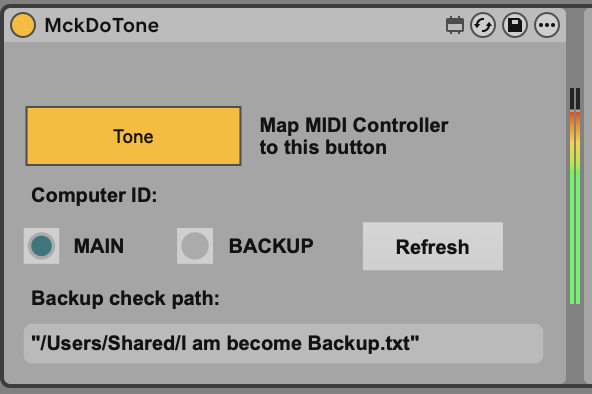
| Description: | Here is an overengineered solution to a very niche problem... Problem - DirectOut EARS playback systems require a pilot tone on both Main and Backup systems to be able to switch between them in event of failure, I like the prioritise Main behaviour but I'd also like to be able to map my tone generator to my MIDI controller so I can quickly switch between Main and Backup manually like I can on analogue switching systems. Solution - This plugin acts as a tone generator which is MIDI mappable but will ignore the MIDI command to the Backup machine so that you can freely switch between Main and Backup with one button press. Its a one-time drag and drop to identify the backup machine, a .txt file available in the dropbox link on this page into Users/Shared on your Mac, the plugin will detect if this file is present everytime Ableton opens the plugin and decide if your computer is the Main or Backup so any edits you make on the Main will carry over to the Backup without having to make any elaborate workaround for this problem. How to use - Download .amxd Download I am become Backup.txt from dropbox link on this page or create your own file with that name if you dont trust strangers on the interwebz ON THE MAIN COMPUTER - load the plugin into your session, Tone will begin instantly, the plugin will identify the machine as the Main, assign an output channel, MIDI map the Tone button and test it turns on and off, save and collect, send to backup machine ON THE BACKUP COMPUTER ONLY! - load the session from the main computer, the plugin will still think you are running the main, drag and drop a text file named "I am become Backup.txt" without the speech marks into Users/Shared folder on your Mac, press "Refresh" on the plugin and it will detect the txt file and go into the Backup state, now your MIDI controller wont be able to disable the Tone generator and this should run forever. Whenever you open Ableton from now on your txt file will be detected and you wont have to do anything so your edits will be fast and this plugin and its behaviour will be protected. Is this useful? I think so. See what you think. Tested on following devices - DirectOut Exbox.MD Should work with - Any DirectOut EARS device requiring this solution - Andiamo, Prodigy, Maven (although they have more MIDI features available in Globcon) Tested on i7 and M1 Pro Macbooks, this wont work on Windows at the moment sorry, shout if you need it. Tested on Ableton 12, probably wont work on anything earlier because it uses specific Max 9 features - but try it we can live in hope. Disclaimer - This was made by a playback tech with the best intentions - but I'm not a MFL or programming expert so please use at your own risk, I can't be responsible for any show failures using this. That being said, there isnt much in this that should cause any problems. This isn't supported, endorsed or anything to do with DirectOut and theyd probably be fuming if they saw their name mentioned here so please don't ask them about it if you have any problems. Sorry to the DO gods if you see this. Have fun, let me know any thoughts Kind Regards, Jamie |
Details
| Live Version Used: | 12.3.2 |
| Max Version Used: | 9 |
| Date Added: | Mar 25 2026 08:42:42 |
| Date Last Updated: | Mar 25 2026 08:43:19 |
| Downloads: | 8 |
| Website: | https://www.dropbox.com/scl/fi/8h3z7l5i0wtpu4ggdhnbe/MckDoTone.zip?rlkey=tqeuxiupxh8w617hdpcramehd&d |
| ⓘ License: | None |
Average Rating
Log in to rate this device |
-n/a- |
Files
| Device File: | MckDoTone.amxd |
Login to comment on this device.
Browse the full library