Device Details
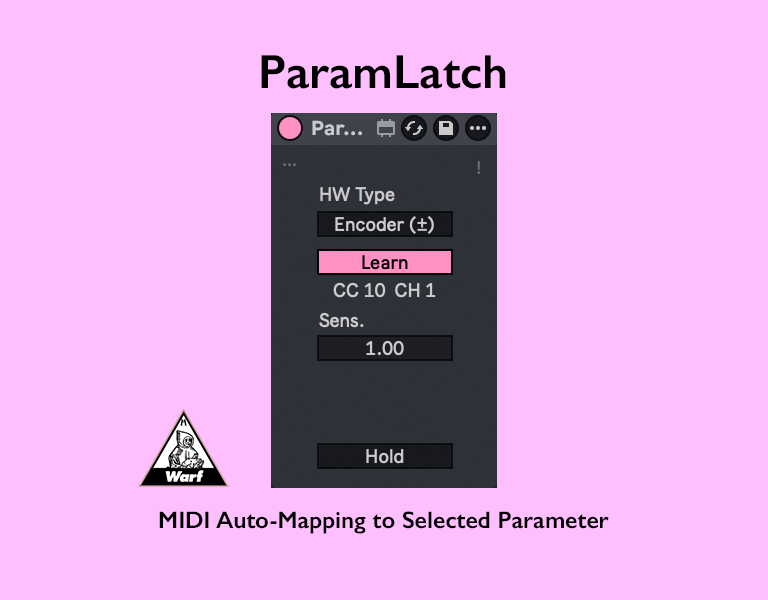
Overview
| Name | Version: | ParamLatch 1.7.5 |
| Author: | warf |
| Device Type: | MIDI Effect |
| Description: | MIDI Auto-Mapping to Selected Parameter - Control the parameter you select - Supports both standard knobs (Pots) and encoders (Endless) - Minimal device width to save screen space setup: - Connect your MIDI device to Live with the right cable. - Go to Live’s Settings and enable the MIDI input port for your device (make sure Track is turned on for that port). - Open the I/O section. - On a MIDI track, select your device in the MIDI From dropdown. - Set the track monitor to In so it always receives incoming MIDI. Then press the Learn button in ParamLatch and move a knob on your MIDI controller up and down widely for about 3 seconds. Release notes - v1.7.3 first Release - v1.7.4 Fixed 2’s Complement encoder detection. - v1.7.5 Added support for Signed Bit relative encoders. |
Details
| Live Version Used: | 12.0.5 |
| Max Version Used: | 8.6.2 |
| Date Added: | Jan 29 2026 10:20:11 |
| Date Last Updated: | Jan 30 2026 02:30:21 |
| Downloads: | 0 |
| Website: | https://ko-fi.com/s/248aff5e38 |
| ⓘ License: | None |
Average Rating
Log in to rate this device |
-n/a- |
Comments
Hello. I like the ideaof useful clean , and small devices for specific task, so I am interested in your collection and I thank yo for making available. Parameter latch is not working for me in windows 11 Ableton 12.3. I have another one wich I use and it is working well . Yours when I useing the Learn function it doesnt do anything. The rest of your m4l pack is working as expected till now.
Posted on January 29 2026 by eRKa |
Report Issue
@eRKa
Sorry, I don’t have a proper manual ready yet 🙏
Could you try this setup:
- Connect your MIDI device to Live with the right cable.
- Go to Live’s Settings and enable the MIDI input port for your device (make sure Track is turned on for that port).
- Open the I/O section.
- On a MIDI track, select your device in the MIDI From dropdown.
- Set the track monitor to In so it always receives incoming MIDI.
Then press the Learn button in ParamLatch and move a knob on your MIDI controller up and down widely for about 3 seconds.
Sorry, I don’t have a proper manual ready yet 🙏
Could you try this setup:
- Connect your MIDI device to Live with the right cable.
- Go to Live’s Settings and enable the MIDI input port for your device (make sure Track is turned on for that port).
- Open the I/O section.
- On a MIDI track, select your device in the MIDI From dropdown.
- Set the track monitor to In so it always receives incoming MIDI.
Then press the Learn button in ParamLatch and move a knob on your MIDI controller up and down widely for about 3 seconds.
Posted on January 29 2026 by warf |
Report Issue
I understand . I dont need a manual for this. I was already checking and assured that all connections are working , and with other device it was working without problems. I like yours because it has the Hold option witch I think could be useful. I am mapping with an encoder. and it looks that sometimes it works, but a lot of times when I am switching on other knobs it is not working. I tried to map using the Pot option and even if my encoder is endless its working better if it is in direct mode, but the problem is that it is not convenient like that when I need only to notch some knobs left and right. When is in pickup mode it has the same erratic state as the Encoder mode. I wanted just to let you know about some possible bugs .
Posted on January 29 2026 by eRKa |
Report Issue
@eRKa
First, please set the HW Type to match your controller:
If you’re using an endless rotary encoder, choose “Encoder (±)”
If you’re using a standard knob (potentiometer), choose “Pot (0–127)”
After that, if it’s still not working properly, I need to clarify this part:
> “but a lot of times when I am switching on other knobs it is not working”
When you say “other knobs”, are you talking about other parameters in Live that you select and try to control with the same hardware knob?
In other words, when you turn the hardware knob, does the first parameter in Live change value correctly, but after you click a different parameter, turning the knob no longer changes that parameter’s value?
If that’s the case, please make sure the Hold button is turned off.
If it’s hard to describe the behavior in words, could you share a short video showing what you do and what happens on screen? That would help a lot.
First, please set the HW Type to match your controller:
If you’re using an endless rotary encoder, choose “Encoder (±)”
If you’re using a standard knob (potentiometer), choose “Pot (0–127)”
After that, if it’s still not working properly, I need to clarify this part:
> “but a lot of times when I am switching on other knobs it is not working”
When you say “other knobs”, are you talking about other parameters in Live that you select and try to control with the same hardware knob?
In other words, when you turn the hardware knob, does the first parameter in Live change value correctly, but after you click a different parameter, turning the knob no longer changes that parameter’s value?
If that’s the case, please make sure the Hold button is turned off.
If it’s hard to describe the behavior in words, could you share a short video showing what you do and what happens on screen? That would help a lot.
Posted on January 29 2026 by warf |
Report Issue
It is set correctly on Encoder mode for endless, and yes I am talking about other parameters in Live that I have selected and tried to control with the same hardware knob. Sorry if I was not clear about that. The Hold button is off. Maybe I will try to capture the screen tomorrow.
Posted on January 29 2026 by eRKa |
Report Issue
This device is very suitable for me. Thank you
Explore the best dash cams of 2026 for every budget. Compare features, video quality, and prices to find the perfect dash cam for your car
https://BestDashCam2026.com
Explore the best dash cams of 2026 for every budget. Compare features, video quality, and prices to find the perfect dash cam for your car
https://BestDashCam2026.com
Posted on January 29 2026 by halen |
Report Issue
@eRKa
I’ve fixed the encoder detection. Please download it again and confirm it’s working properly.
I’ve fixed the encoder detection. Please download it again and confirm it’s working properly.
Posted on January 30 2026 by warf |
Report Issue
Login to comment on this device.
Browse the full library