Device Details
Overview
| Name | Version: | Spacebar Counter 1.3 |
| Author: | SpacebarTouring |
| Device Type: | Audio Effect |
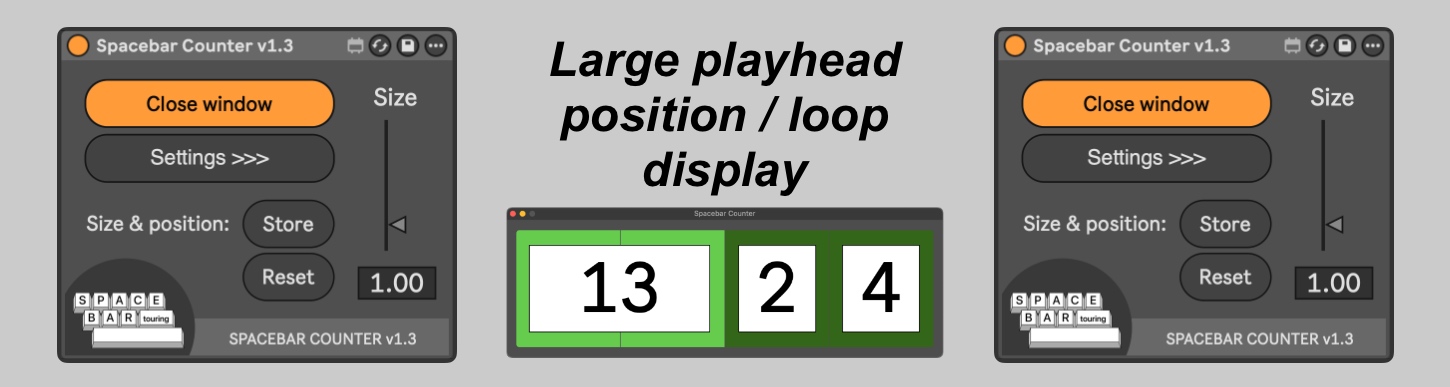
| Description: | === SPACEBAR COUNTER v1.3 - Large playhead position/loop display === If you're a playback tech, or in fact anybody who finds Live’s position and loop displays too small when playing live, this Max for Live device does 3 things that you might find useful: 1 It has a floating window with a big bar/beat/sub-division counter. Very useful if you're running a project on more than 1 machine, and want to see at a glance that they're at the same position. 2 The background of the floating window changes colour if Live's loop function is activated. No more leaving it in loop mode by accident. 3 There's a segmented progress bar which will give you a graphical representation of which beat you’re on. This will adapt for time signatures up to 9 beats per bar. This is a Max for Live audio device, and can be placed on any track, other than MIDI tracks which you are using to send MIDI (e.g. to another MIDI track or external MIDI device). You should only run 1 instance per Ableton project. — Controls — Size: The floating window is re-sizeable. The default size (1.00) happens to be exactly the same width as the expanded Show mode of Full Fat's excellent Conductor plug-in. Set the size using either the slider or the numerical display. Double-click to return to 1.00. Open/Close window: Self-explanatory. This button is assignable to a MIDI message or key command* - useful for getting it out of the way if you’re editing and need more screen real-estate. Size/position: - Store: Clicking on this will cause the current size and position of the floating window to be stored - they will then be included in the project file when you save it. This can also be achieved by clicking on the bar number in the floating window. - Reset: Sets the size to 1.0 and moves the window to its default position. — Settings — Window style: Select either floating or regular. Floating means that the window will always stay in front of other windows; however, it will disappear if Live is not the focussed application. Regular means that the window will remain visible, even when other applications are in focus; however, like normal windows, it can get obscured by other windows, including the main Live window. You will probably only want to use the Regular setting if you like to position the floating window in its own space on your display, away from the main Live window, and want it to remain visible even when you click onto a different application. Colours: All colours can be customised - window background, progress bar, progress bar background when transport is stopped, progress bar background when transport is playing, loop indicator, number text, number boxes and number box borders. If there’s an element you don’t want to include, set its opacity to 0%. Colours will be saved with your project. === SYSTEM REQUIREMENTS === You will need Max for Live (included with Ableton Live Suite). This device was built and tested in Max 9.0.7 / Ableton Live 12.3.5, running MacOS Sequoia 15.5, and has been tested in Max 8.6.2 / Ableton Live 11.3.13. Earlier versions of Max, Live or MacOS may not work. If you experience any strange behaviour with other versions, please let me know at spacebartouring@gmail.com *Please note that some versions of Max for Live have a bug where clicking on the device can prevent MIDI and key commands from reaching or passing through the device. Clicking elsewhere within Live causes them to work as expected. This is an issue which I’ve seen in multiple Max MIDI devices in Max 8 with Live 11. It appears to have been fixed in more recent versions. |
Details
| Live Version Used: | 11.3.13 |
| Max Version Used: | 8.5.8 |
| Date Added: | Dec 04 2024 06:20:37 |
| Date Last Updated: | Apr 20 2026 14:18:25 |
| Downloads: | 0 |
| Website: | https://spacebartouring.gumroad.com/l/spacebarcounter |
| ⓘ License: | Commercial |
Average Rating
(1) Log in to rate this device |
5 |
Login to comment on this device.
Browse the full library