Device Details
Overview
| Name | Version: | TRIGUE 1.0 |
| Author: | gregslivar |
| Device Type: | MIDI Generator |
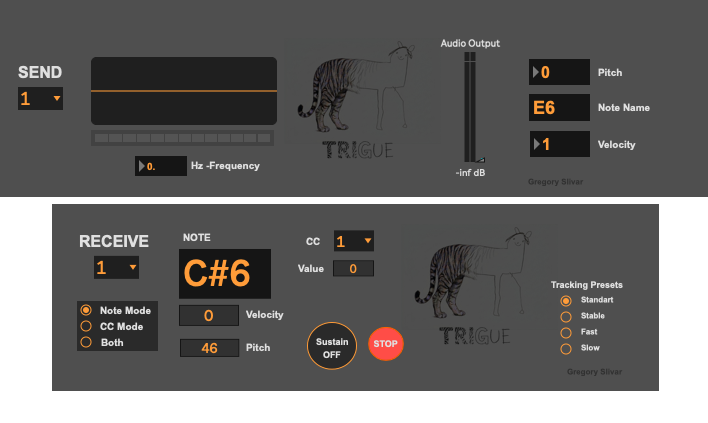
| Description: | TRIGUE is a two-device Max for Live system that turns monophonic audio input (voice, instrument) into controllable MIDI for performance and sound design. ====================================================== The Send device (Audio Effect) analyzes incoming audio in real time, tracks pitch and amplitude, converts them to MIDI note/velocity data, and routes the result through selectable internal buses (1–5). Its interface provides quick visual feedback (waveform, meter, Hz/pitch, note name, velocity) plus direct control of dry audio monitoring level. The Receive device (MIDI Effect) listens to the matching bus and outputs musical MIDI. It includes three operation modes: Note (monophonic note output), CC (amplitude-to-CC output), and Both (notes + CC simultaneously). Users can select CC number (1–127), choose tracking presets (Standard / Stable / Fast / Slow) to balance stability vs latency, use a momentary Sustain control, and trigger Stop (panic) to instantly clear held notes. Together, Send + Receive provide a practical Audio-to-MIDI workflow with flexible routing and live-friendly controls. ==================================== Quick Setup in Ableton Live 1) Add the Send device (Audio Effect) Create or choose an Audio Track (mic, vocal, instrument, or audio clip source). Drag the TRIGUE Send device to that track (as an Audio Effect). In the Send device, choose a bus in Send (1–5). 2) Add the Receive device (MIDI Effect) Create or choose a MIDI Track. Add your target instrument after the MIDI effect (for example Operator, Wavetable, VSTI, etc.). Drag the TRIGUE Receive device before the instrument (as a MIDI Effect). In the Receive device, choose the same bus in Receive (1–5) used in Send. 3) Choose operation mode in Receive Note: outputs notes only. CC: outputs CC only. Both: outputs notes + CC. If using CC Mode or Both, choose the desired CC number (1–127). ------------------------ © 2026 Gregory Slivar ------------------------------------------------------------------ 𝐍𝐎𝐓𝐈𝐂𝐄 𝐈’𝐦 𝐡𝐚𝐯𝐢𝐧𝐠 𝐭𝐫𝐨𝐮𝐛𝐥𝐞 𝐮𝐩𝐥𝐨𝐚𝐝𝐢𝐧𝐠 𝐭𝐡𝐞 .𝐳𝐢𝐩 𝐟𝐢𝐥𝐞, 𝐚𝐬 𝐢𝐭 𝐜𝐨𝐧𝐭𝐚𝐢𝐧𝐬 𝐭𝐰𝐨 .𝐚𝐦𝐱 𝐟𝐢𝐥𝐞𝐬. 𝐖𝐡𝐢𝐥𝐞 𝐭𝐡𝐢𝐬 𝐢𝐬𝐬𝐮𝐞 𝐢𝐬 𝐛𝐞𝐢𝐧𝐠 𝐫𝐞𝐬𝐨𝐥𝐯𝐞𝐝, 𝐲𝐨𝐮 𝐜𝐚𝐧 𝐚𝐥𝐭𝐞𝐫𝐧𝐚𝐭𝐢𝐯𝐞𝐥𝐲 𝐝𝐨𝐰𝐧𝐥𝐨𝐚𝐝 𝐢𝐭 𝐟𝐫𝐨𝐦 𝐦𝐲 𝐰𝐞𝐛𝐬𝐢𝐭𝐞: https://www.gregoryslivar.com/#softwares |
Details
| Live Version Used: | 12.0.5 |
| Max Version Used: | 8.6.2 |
| Date Added: | May 01 2026 20:08:22 |
| Date Last Updated: | May 12 2026 17:52:43 |
| Downloads: | 79 |
| Website: | https://gregoryslivar.com/#softwares |
| ⓘ License: | AttributionNonCommercialShareAlike |
Average Rating
(1) Log in to rate this device |
5 |
Files
| Device File: | TRIGUE.zip |
Comments
NOTICE
I’m having trouble uploading the .zip file, as it contains two .amx files.
While this issue is being resolved, you can alternatively download it from my website:
https://www.gregoryslivar.com/#softwares
I’m having trouble uploading the .zip file, as it contains two .amx files.
While this issue is being resolved, you can alternatively download it from my website:
https://www.gregoryslivar.com/#softwares
Posted on May 02 2026 by gregslivar |
Report Issue
Great device! Easy to set up, and worked perfectly. There are a few similar tools out there, but this one seemed to work really well. Also love the tiger art haha. thank you!
Posted on May 02 2026 by shinytheshiny |
Report Issue
Login to comment on this device.
Browse the full library
lol
I'll try again when fixed.