Device Details
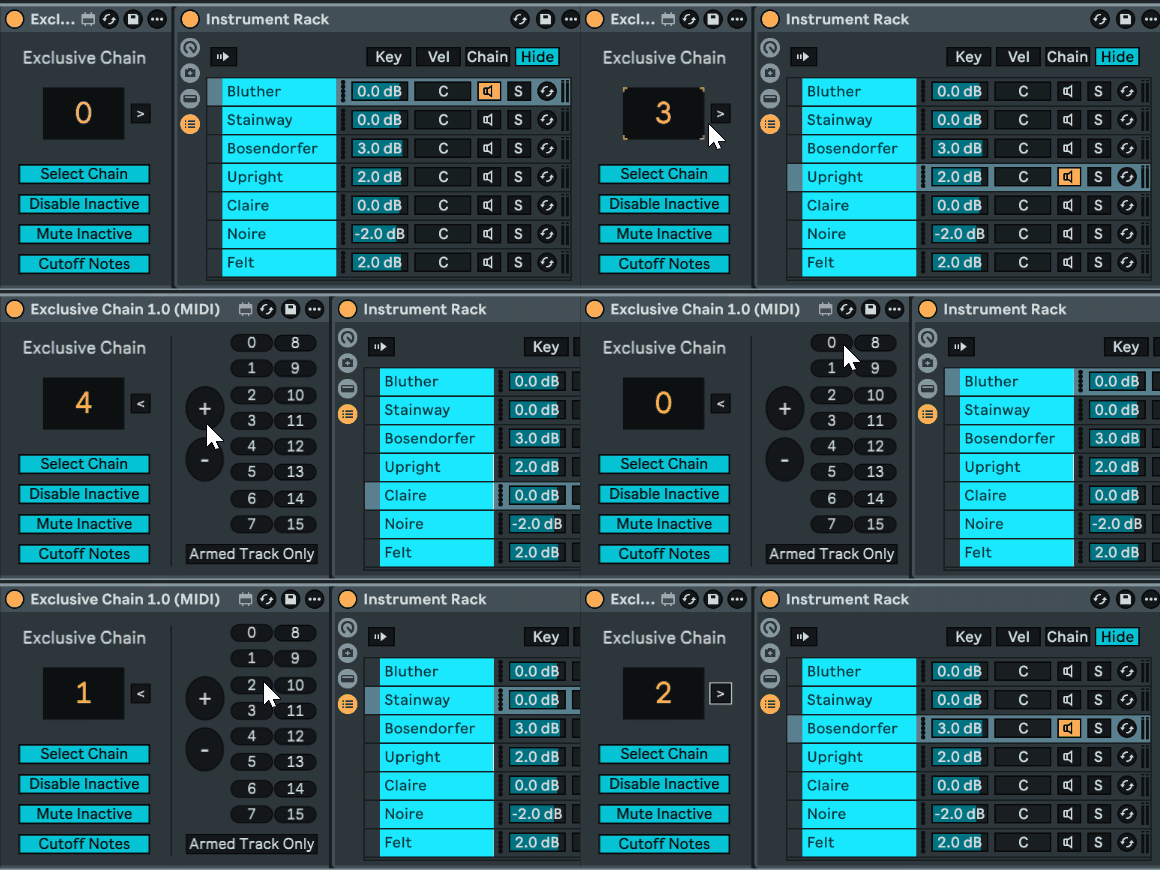
Overview
| Name | Version: | Exclusive Chain 1.1 |
| Author: | Maboroshy |
| Device Type: | MIDI Effect |
| Description: | One of typical use cases for Ableton Live racks is an instrument or effects path selector, when you want only one exclusive chain active at a time, with others disabled to save CPU resources. There's a recipe that involves mapping rack's chain selector and each device's on/off toggle to a single macro knob. My device does this without all these mappings and provides a numberbox that: - automatically attaches to the next rack on the track or chain, any type of rack (won't be useful with a drum rack) - selects chosen chain putting the "blue hand" on its first device - mutes all the other chains - enables the first device on the chosen chain (or more if you group them) - disables the first devices on the other chains - sends "note off" and resets sustain before changing chain Unlike chain selector mapping recipe, you can add, remove or rearrange rack chains without needing to update any mappings. The device also provides +/- and chain index buttons for controller mapping. There's an option for the buttons to work only while the track is armed, which allows sharing controller mappings with similar devices on other tracks. The numberbox doesn't respect this option and will always work. The buttons can't be used while the numberbox is mapped to a controller. The "blue hand" following chain selection can't be disabled. If you rely on the "blue hand" staying on a particular device and want to active chain selection, you'll have to disable the "Select Chain" option and use the rack's chain selector instead. The device is also hosted on GitHub: https://github.com/Maboroshy/Max-for-Live-Devices/tree/main/Exclusive%20Chain You can get an audio version there. Licensed under the GNU Lesser General Public License v3.0 (LGPL‑3.0). Changelog v1.1 - 02.02.2026 - Fixed Exclusive Chain parameter automation - Improved rack detection - Silenced unwanted console messages |
Details
| Live Version Used: | 12 |
| Max Version Used: | 8.6 |
| Date Added: | Jan 25 2026 15:54:40 |
| Date Last Updated: | Feb 02 2026 18:37:22 |
| Downloads: | 366 |
| ⓘ License: | None |
Average Rating
(1) Log in to rate this device |
5 |
Files
| Device File: | Exclusive Chain 1.1 (MIDI).amxd |
Comments
Can't get either audio or midi amxd file to be recognized in Live 12.3
Posted on January 27 2026 by CarlSolovox |
Report Issue
Can't reproduce. I open a new Live set, double click the file, get the device on track. Same Live 12.3.
Posted on January 28 2026 by Maboroshy |
Report Issue
Tried that. Tried dragging onto a midi channel, audio channel, neither works. Double-click doesn't work. Is there an installation process needed? Usually I can just drag a new .axmd file into a set and it works.
Posted on January 28 2026 by CarlSolovox |
Report Issue
I've resaved the device and put it to the testing branch on GitHub, please check:
https://github.com/Maboroshy/Max-for-Live-Devices/raw/refs/heads/testing/Exclusive%20Chain/Exclusive%20Chain%201.0%20(MIDI)%20(test).amxd
https://github.com/Maboroshy/Max-for-Live-Devices/raw/refs/heads/testing/Exclusive%20Chain/Exclusive%20Chain%201.0%20(MIDI)%20(test).amxd
Posted on January 29 2026 by Maboroshy |
Report Issue
Great idea, but it does not play the first note of the sequence when i change chains at the start of the clip.
Posted on February 02 2026 by FloorForce |
Report Issue
selecting chain one with the exclusive chain parameter is problematic. sometimes it does not work.
Posted on February 02 2026 by FloorForce |
Report Issue
I've updated the device to fix the chain selection issues and improve rack detection. Please check the new version.
To change chains and play notes simultaneously, you'll need to disable the “Disable Inactive” and “Cut Off Notes” options and use only “Mute Inactive.” Enabling and disabling devices takes time, so notes played right at chain change may end up somewhere in between. I advise leaving a margin between changing the chain and playing notes.
To change chains and play notes simultaneously, you'll need to disable the “Disable Inactive” and “Cut Off Notes” options and use only “Mute Inactive.” Enabling and disabling devices takes time, so notes played right at chain change may end up somewhere in between. I advise leaving a margin between changing the chain and playing notes.
Posted on February 02 2026 by Maboroshy |
Report Issue
Hi, I load it before a Instrument Rack that has Chains and it turns the devices off and mute like is supposed to but the chain selector doesn't move to the desired chain. Its a great Idea and it will be very good if it can select the chain. If you are gonna work on it and fix it can you add more buttons to Map at least 32 chains? Thanks a lot!!! Another great thing can be add a programmable delay before turn off and mute the device
Posted on February 18 2026 by fermuscolo |
Report Issue
The device can select chains, it does that on preview animation. Max for Live has no way to get rack's chain selector zone for a specific chain. The idea is that the device replaces rack's chain selector so you don't have to update zones when rearranging chains.
I could add more buttons but I think about making universal "button device" that can be mapped to any parameter instead.
I'll implement the delays in the next version.
I could add more buttons but I think about making universal "button device" that can be mapped to any parameter instead.
I'll implement the delays in the next version.
Posted on February 18 2026 by Maboroshy |
Report Issue
OK, sorry I was accustomed to another old device that moved the chain selector but now I see it works well. The delay it would be great, and sorry to ask I use like 30 chains and I like to select each one from a Midi controller so thats why Im looking for 32 buttons to map. Thanks a lot!! Anyway I can divide it in two tracks and run 16 and 16. Thanks for your great work!!
Posted on February 19 2026 by fermuscolo |
Report Issue
Perfect! ❤️
Posted on April 04 2026 by matheusatallah |
Report Issue
Login to comment on this device.
Browse the full library