Device Details
Overview
| Name | Version: | BLOOMCHORD 1.02 |
| Author: | Hillbombeats |
| Device Type: | MIDI Effect |
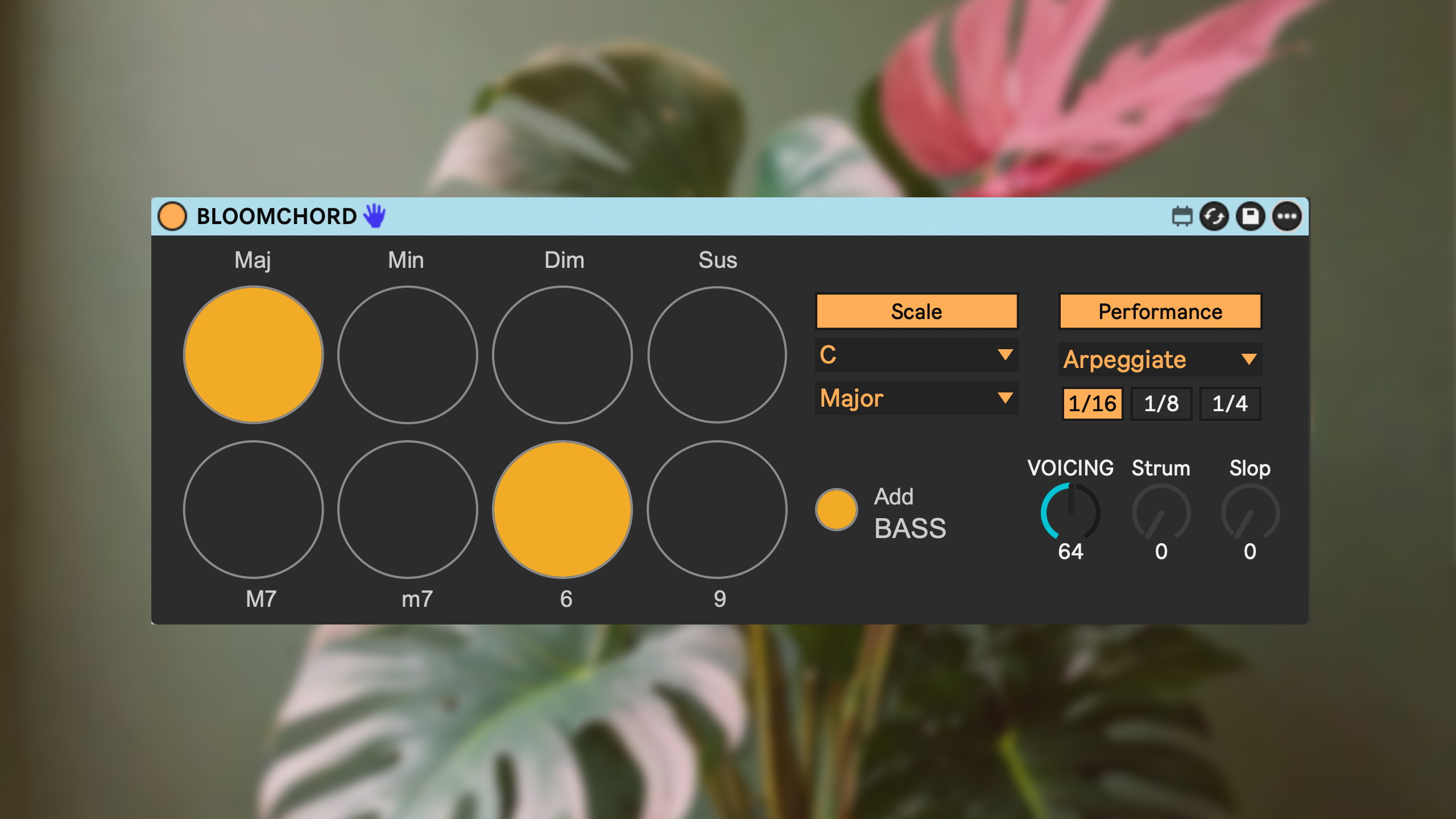
| Description: | BLOOMCHORD – Orchid-inspired harmonic engine for Ableton Live BLOOMCHORD is a Max for Live MIDI effect that turns single notes into full, musical chords – inspired by the harmonic ideas behind the Orchid synth, but redesigned for Ableton Live. Play one note, and BLOOMCHORD generates rich voicings, scale-aware harmonies and performance patterns that stay in a natural register, adapt as you move around the keyboard, and respond in real time when you change chord type, extensions or inversion. Perfect for writing progressions fast, improvising live, or using as a “harmonic brain” in your template. Core features Single-note → chord engine Choose between Maj, Min, Dim, Sus triads and add: 6 m7 M7 9 Scale Lock (Key Mode) Lock BLOOMCHORD to a key + scale (Major, Minor, Dorian, Lydian, etc.). Any played note becomes a harmonically correct chord in that scale. Non-scale notes are remapped to musical sus/altered chords. Adaptive voicing & inversion Chords are automatically voiced to sit in a compact, musical register. An Inversion Dial lets you push notes up/down in octaves on top of that voicing. Extensions that respect the scale In Scale Lock, 6 / 7 / 9 always stay “inside” the selected key. With chord buttons active, extensions switch to more “raw” intervals for deliberate tension. Performance modes Add motion and feel with built-in performance engines: Strum Strum (2 Octaves) Slop (human timing & velocity variation) Arpeggiate Arpeggiate (2 Octaves) Harp with controls for strum speed, slop amount and arp. Bass note toggle Optional lower-octave root to anchor the harmony. Morphing without retriggering Change chord type, toggles, Scale Lock or inversion while holding a note – BLOOMCHORD morphs the voices smoothly instead of retriggering everything. Chord name display Shows the chord symbol (with 7/9/6 etc.) while it’s being held and clears when you release. Sustain pedal support Works like a synth: hold chords with a sustain pedal and let BLOOMCHORD handle note-offs cleanly. Range filter for clean playability Only C3–B3 are used as “playable” input for chord generation; the rest of the keyboard stays disabled. MIDI hotkeys (momentary chord & extension control) You can also control the chord engine directly from pads or keys. These hotkeys behave like piano keys (hold = on, release = off): Chord toggles C2 → Maj D2 → Min C#2 → Dim D#2 → Sus Extension toggles E2 → M7 F2 → m7 G2 → 6 A2 → 9 This makes it easy to “play the engine” from a controller: one hand triggers root notes, the other shape-buttons the harmony. |
Details
| Live Version Used: | 12.0.5 |
| Max Version Used: | 8.6.2 |
| Date Added: | Nov 21 2025 08:43:18 |
| Date Last Updated: | Nov 24 2025 08:07:05 |
| Downloads: | 2 |
| Website: | https://hillbom.gumroad.com/l/BLOOMCHORD |
| ⓘ License: | Commercial |
Average Rating
(2) Log in to rate this device |
5 |
Comments
are there a demo vid of this device? a bit pricy when u can't what it do or how it works :)
Posted on November 24 2025 by LarsLyd |
Report Issue
Fyi, the scale feature doesn't seem to work for me. other than that I love the idea of this device
Posted on November 29 2025 by AlexMerts |
Report Issue
Hey great product. However The extensions dont seem to work for me, specifically the lower ones (M7, m7, 6 and 9). Its only playing the single note when I use those. Love the device though and really hope that can be fixed! Thanks again.
Posted on December 02 2025 by Casimov |
Report Issue
"Fyi, the scale feature doesn't seem to work for me. other than that I love the idea of this device"
Hey, I'm not sure how it's not working for you. The device is designed so that if you play in Scale-mode there will be a generated chord in that scale from the root-note you're playing. If you choose to use one of the chord toggles (Min, Maj, Sus, Dim) that will overwrite the scale and let you play that exact chord. The extension toggles however will not overwrite the scale and will quantize to the closest note in the scale.
"Hey great product. However The extensions dont seem to work for me, specifically the lower ones (M7, m7, 6 and 9). Its only playing the single note when I use those. Love the device though and really hope that can be fixed! Thanks again."
Hey and thank you for buying! Hmm can you specify on how they're not working?
Hey, I'm not sure how it's not working for you. The device is designed so that if you play in Scale-mode there will be a generated chord in that scale from the root-note you're playing. If you choose to use one of the chord toggles (Min, Maj, Sus, Dim) that will overwrite the scale and let you play that exact chord. The extension toggles however will not overwrite the scale and will quantize to the closest note in the scale.
"Hey great product. However The extensions dont seem to work for me, specifically the lower ones (M7, m7, 6 and 9). Its only playing the single note when I use those. Love the device though and really hope that can be fixed! Thanks again."
Hey and thank you for buying! Hmm can you specify on how they're not working?
Posted on December 03 2025 by Hillbombeats |
Report Issue
Any chance of this working on Live 10?
Posted on December 04 2025 by funkmeist3r |
Report Issue
Ok I see you have a hit on your hands. Now can you flesh it out on Push 3 Standalone because it is WORKING! I only spent 10 minutes but WOW! ✊🏿 🤯
Posted on December 13 2025 by RodRayGo |
Report Issue
Login to comment on this device.
Browse the full library