Device Details
Overview
| Name | Version: | LiveSaver 2.0.5.1 |
| Author: | bugbytz |
| Device Type: | MIDI Effect |
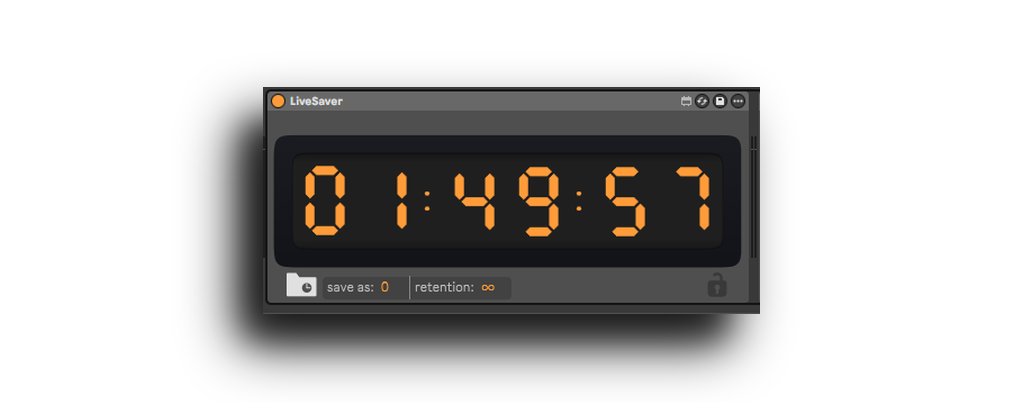
| Description: | LiveSaver is a Max for Live device that automatically saves your Ableton Live Sets on a schedule you choose. Set an interval, start it, and LiveSaver will trigger a save at that cadence while you work. The device’s look dynamically matches the Ableton Live theme you’re using. One .amxd works in both Live 11 and Live 12. When Ableton crashes, sometimes VST parameters are entirely lost; by periodically saving your set, LiveSaver will mitigate the impact of these unfortunate situations. Support was also added for Ableton Live 11.3.42 |
Details
| Live Version Used: | 12.2.5 |
| Max Version Used: | 9.0.8 |
| Date Added: | Sep 12 2025 12:57:13 |
| Date Last Updated: | May 28 2026 01:15:09 |
| Downloads: | 1 |
| Website: | https://bugbytz.gumroad.com/l/livesaver |
| ⓘ License: | Commercial |
Average Rating
Log in to rate this device |
-n/a- |
Comments
I'm aware of the undo bug, a fix is in progress currently.
Posted on September 13 2025 by bugbytz |
Report Issue
The undo bug has been fixed, please redownload the fix from gumroad if you downloaded already. Sorry about that!
Posted on September 13 2025 by bugbytz |
Report Issue
Probably a stupid question - I can set a time but then how do I start it working?
The separator lights flash but it doesn't seem to be saving, or counting down but not sure if it's supposed to count.
Thanks
The separator lights flash but it doesn't seem to be saving, or counting down but not sure if it's supposed to count.
Thanks
Posted on September 14 2025 by BigRainLNT |
Report Issue
Which OS are you running? Also do the numbers change colors after typing in the time and pressing enter?
Posted on September 14 2025 by bugbytz |
Report Issue
Also which version of Ableton?
Posted on September 14 2025 by bugbytz |
Report Issue
I’ll add that I updated the deliverable yesterday as the Windows versions were accidentally uploaded without its needed dependency accidentally which sounds like it may be the case on your machine.
Posted on September 14 2025 by bugbytz |
Report Issue
I enter time, but nothing happens. Seems like it's stuck.
Posted on September 22 2025 by romanwave |
Report Issue
It sounds like you may be missing the built-in external. Did you download before or after the 14th of this month?
Posted on September 24 2025 by bugbytz |
Report Issue
Hi, I recently purchased this -- was just wondering if you could share a little on how it works? Does my Ableton window need to be focused for it to save, do I need to keep my save hotkey as Cmd+S?
Posted on November 24 2025 by verylargesession |
Report Issue
Hey sorry for the delayed response, so the Ableton window does not need to be focused manually for it to save. The device will however focus the window prior to saving. The auto-hotkey is hardcoded as cmd+s in the device. I recently received a detailed report about an issue requiring an immediate fix. Yesterday's update fixed that issue and I highly recommend all users to re-download it from Gumroad. For faster response times from me please shoot me an email in the provided pdf.
Posted on December 13 2025 by bugbytz |
Report Issue
I want to say HOW MUCH I APPRECIATE LIVESAVER, I can't believe having this Ableton Live auto save tool wasn't a thing until NOW, but I'm sure glad it is. Isaac/bugbytz has been providing me with EXCELLENT SUPPORT to get it working on macOS w/Live 12. What a clever, simple-to-use tool.
Before LiveSaver, I got frustrated when I was on a roll 'n' recording tracks — only to have everything disruptively halt after a crash, and losing my VST settings too ughhh. To add insult to injury, Live also doesn't reliably always restore, so I had to go even further back.
Now with LiveSaver, I have peace of mind. It's easy to change the save time interval on-the-go, and overwrite the default so it automatically shows up. Even if Live's in the background, it'll momentarily bring it to the foreground to save. (And you can toggle LiveSaver off as-needed.)
I have LiveSaver as part of my project template so it saves me every 10 minutes, and overall it's worked robustly across dozens of projects thus far. I'll continue to report issues as I notice 'em.
💖💾
Before LiveSaver, I got frustrated when I was on a roll 'n' recording tracks — only to have everything disruptively halt after a crash, and losing my VST settings too ughhh. To add insult to injury, Live also doesn't reliably always restore, so I had to go even further back.
Now with LiveSaver, I have peace of mind. It's easy to change the save time interval on-the-go, and overwrite the default so it automatically shows up. Even if Live's in the background, it'll momentarily bring it to the foreground to save. (And you can toggle LiveSaver off as-needed.)
I have LiveSaver as part of my project template so it saves me every 10 minutes, and overall it's worked robustly across dozens of projects thus far. I'll continue to report issues as I notice 'em.
💖💾
Posted on December 27 2025 by Torley |
Report Issue
Login to comment on this device.
Browse the full library